Page 1 of 2
Re: What Printer Profile Should I Use
Posted: 03 Dec 2014, 19:01
by customprints
Hi, After posting a few posts here on the forum and going through some great help from more experienced members, I have printed a number of mugs that are easily sell-able. I have had some difficulties printing the colour red, Seems to be pink or purple...
One member has told me to print via the Richo printer not the PowerDriver.
Whilst printing via the Richo driver I have been told to the ICC Profile, But I am not sure what profile I should be selecting from the drop down list of available printer profiles?
Can someone point me in the right direction please.
Thanks
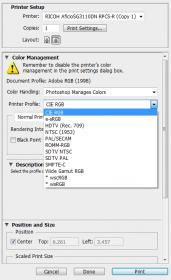
- vB_ID:3084
- printer-profile-settings.jpg (10.06 KiB) Viewed 53 times
Re: What Printer Profile Should I Use
Posted: 03 Dec 2014, 19:17
by Justin
Have you downloaded the separate profile? This is a different download to the Powerdriver.
http://sawgrasseurope.com/technical-sup ... c-profiles
Re: What Printer Profile Should I Use
Posted: 03 Dec 2014, 19:53
by pisquee
If you're using Sawgrass' inks then you need the ICC profile from them.
All PowerDriver does is handle managing colours and printing with the appropriate ICC profile.
If you do it that way, then Photoshop is effectively blind from what your printer is doing, and so you can't soft proof,along with all the expensive and most likely patented software in Photoshop used in printer and colour management is thrown away and replaced by PowerDriver. If you've paid for Photoshop, then it seems silly to cripple a chunk of its functionality.
Re: What Printer Profile Should I Use
Posted: 03 Dec 2014, 21:20
by JMugs
Power driver is excellent with Coraldraw, but as Pisquee points out restricts the benefits of Photoshop.
Janners
Re: What Printer Profile Should I Use
Posted: 03 Dec 2014, 22:02
by Paul
I had this same problem with my ricoh.
I must officially say it.... ICC for rjet ARE CRAP!!!!

reds are dirty pink, blues are wrong too!
I tried to get use to them but nope... I couldn't do that. no matter what i print it was useless (anything with red. other colours was ok ish)
Funny bit is that even a guy i know, who is a dustman and i thought he wouldn't care less, noticed wrong colours straight away :/
custom icc fixed the issue and i am printing descent now.
I managed to secure good contract with football club to print they official merchandise and it has LOADS of red
they wouldn't be to happy with original jet icc profile
Re: What Printer Profile Should I Use
Posted: 04 Dec 2014, 01:51
by customprints
Hi Paul, If you could point me in the direction of where I could sauce a custom ICC profile that would be fantastic.
Im a using Photoshop CS6 / SubliJet-R Ink / Richo SG 3100DN / 3D Mini Sub oven machine.
Thanks
Re: What Printer Profile Should I Use
Posted: 04 Dec 2014, 09:11
by spongerobinson
customprints;94839 wrote:Hi Paul, If you could point me in the direction of where I could sauce a custom ICC profile that would be fantastic.
Im a using Photoshop CS6 / SubliJet-R Ink / Richo SG 3100DN / 3D Mini Sub oven machine.
Thanks
Paul is the source you need.
Sent from my GT-I9300 using Tapatalk
Re: What Printer Profile Should I Use
Posted: 04 Dec 2014, 09:15
by A11kns
Paul creates them. I've just paid and sent my charts to go to get done.
Re: What Printer Profile Should I Use
Posted: 04 Dec 2014, 11:52
by customprints
Hi Allkns & SpongerRobinson - Thanks
I will contact Paul through his website and go through the ordering process,
Just hope this ICC profile helps me print via photoshop to my mugs print the expected colour in the 3d mini sub machine.
Re: What Printer Profile Should I Use
Posted: 04 Dec 2014, 12:31
by A11kns
I've heard and read good results from his ICC, that's why I getting mine via Paul.