Page 1 of 3
Re: Ricoh 3110 - Orange is Printing Red
Posted: 16 Apr 2015, 10:39
by Ucase Ltd
Hey All,
I haven't had any real issues for a while but today I went to print and something's not right.
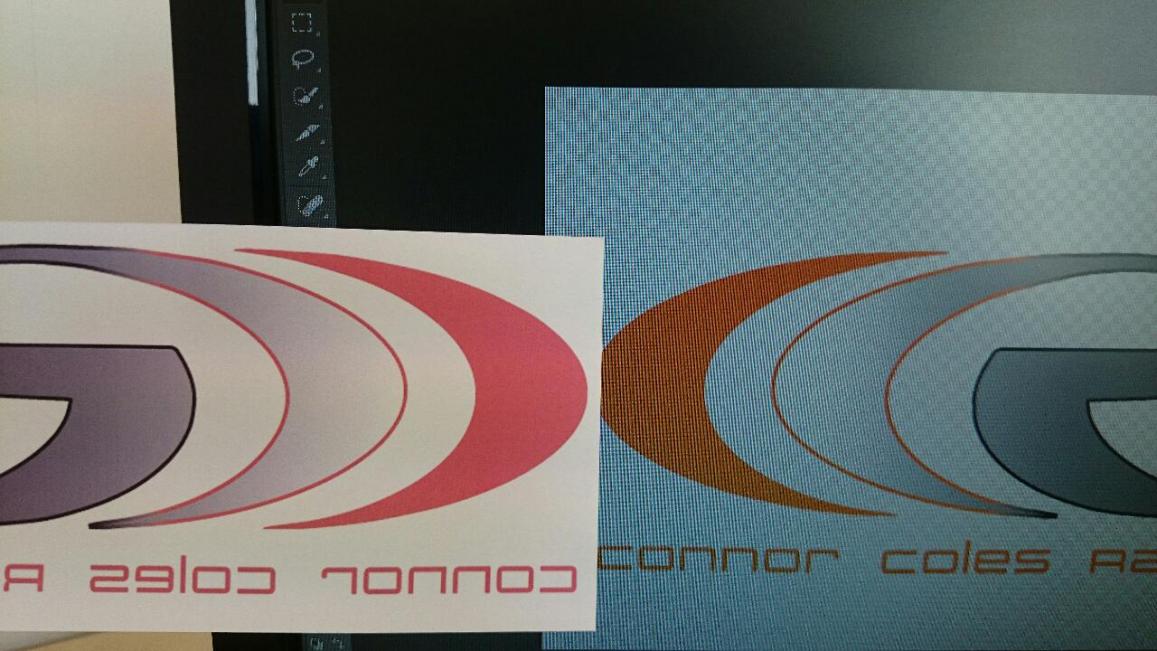
- vB_ID:3391
- DSC_0091.jpg (97.28 KiB) Viewed 446 times
It's not the greatest picture but on the left is my print out which is red. On the right is my screen which is orange (it should be orange).
This has never happened before - I've never done any kind of custom ICC, just installed drivers as directed on the Sawgrass website and it's all been fine up until now.
I'm using Photoshop CC with Powerdriver v4
Printer = Ricoh 3110
Inks = Sublijet R
Paper = BMS Subliclassic which has been fine up until now.
Any advice - Pointers greatly appreciated.
Thanks,
John.
Re: Ricoh 3110 - Orange is Printing Red
Posted: 16 Apr 2015, 10:44
by ArferMo
Do a head test print to see if one colour channel is blocked.
Photoshop is a right pain with colour printing it keeps wanting to use some stupid american setting that cocks colours right up.
Re: Ricoh 3110 - Orange is Printing Red
Posted: 16 Apr 2015, 10:49
by Ucase Ltd
ArferMo;100365 wrote:Do a head test print to see if one colour channel is blocked.
Photoshop is a right pain with colour printing it keeps wanting to use some stupid american setting that cocks colours right up.
Thanks ArferMo - Head test completed - No problems there so that's not the issue.
Re: Ricoh 3110 - Orange is Printing Red
Posted: 16 Apr 2015, 10:50
by ArferMo
Don't forget if you are using a windows PC that you probably had a BIG update yesterday and that could have changed some of your settings.
Re: Ricoh 3110 - Orange is Printing Red
Posted: 16 Apr 2015, 10:52
by Ucase Ltd
Thanks again - I don't have Auto-updates on so no changes there either.
Re: Ricoh 3110 - Orange is Printing Red
Posted: 16 Apr 2015, 10:53
by socialgiraffe
What is the colour breakdown?
Re: Ricoh 3110 - Orange is Printing Red
Posted: 16 Apr 2015, 10:56
by Ucase Ltd
Ooh - I have just noticed - When I use the colour picker to select that orange there is a little exclamation mark on the RGB colour slider (on the right) that says "Warning: Out of Gamut for printing". No idea why or how to correct it though?
Re: Ricoh 3110 - Orange is Printing Red
Posted: 16 Apr 2015, 10:57
by Ucase Ltd
socialgiraffe;100370 wrote:what is the colour breakdown?
r = 255
g = 89
b = 33
Re: Ricoh 3110 - Orange is Printing Red
Posted: 16 Apr 2015, 10:59
by socialgiraffe
There is your answer, change the colour slighty so it falls back in the range.
Re: Ricoh 3110 - Orange is Printing Red
Posted: 16 Apr 2015, 11:20
by Ucase Ltd
POO- I got all excited thinking what a simple fix but All Gamut is now in range and still same problem.