Page 1 of 1
Re: Have Sawgrass stopped Powerdriver??
Posted: 02 Apr 2018, 10:49
by Quinsfan
I have just got a new PC and need powerdrive to use my Ricoh 3110 but there is no link on the Sawgrass Site you need to contact them. Has anyone got a ework around as I have just installed the PC as the old one went pop and i need to finish an order for Tuesday. NOT A HAPPY BUNNY AT THE MOMENT!!!
Do you think the Virtuoso driver will work?
Re: Have Sawgrass stopped Powerdriver??
Posted: 02 Apr 2018, 12:15
by UK Printed Mugs
Yes they have stopped it. They want people to use print studio instead but having had SG support scratching theirs heads as to why we couldn’t print using it it turns out you cannot print from Photoshop!! Apparently you need to save everything you do as jpg and then drag it into a folder.
SG support will send you PD4 if asked.
Sadly we are not back in studio until tomorrow so cannot check work computers for download to send on.
Re: Have Sawgrass stopped Powerdriver??
Posted: 02 Apr 2018, 17:45
by Quinsfan
Managed to find it on and even older laptop that is just used for my plotter.
Sent from my iPhone using Tapatalk
Re: Have Sawgrass stopped Powerdriver??
Posted: 03 Apr 2018, 21:55
by PeteO
They announced the discontinuation before xmas i believe you can still download the generic driver if you are installing and printing ICC via software, else i think they want you to use Virtuoso Print Manager if using their inks
Re: Have Sawgrass stopped Powerdriver??
Posted: 04 Apr 2018, 09:30
by wayupnorth
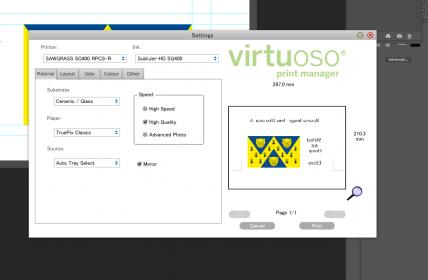
If you have virtuoso folder monitor running in the system tray then you can print to virtuoso using photoshop, the monitor will pick this up and open the printer dialogue. I believe you can drop files into the folder but not had to do this yet. Having used powerdriver and icc in the past I really like this program.
- vB_ID:5129
- virtuoso2.jpg (13.71 KiB) Viewed 700 times
- vB_ID:5129
- virtuoso2.jpg (13.71 KiB) Viewed 700 times
Re: Have Sawgrass stopped Powerdriver??
Posted: 04 Apr 2018, 10:08
by pisquee
If you're using Photoshop though, do you need to use anything except the printer driver, and have PS manage colours with the ICC profiles
Re: Have Sawgrass stopped Powerdriver??
Posted: 04 Apr 2018, 11:02
by wayupnorth
No, profiles already incorporated into vpm which simplifies things.
Re: Have Sawgrass stopped Powerdriver??
Posted: 04 Apr 2018, 11:29
by Quinsfan
Confused. I have Coreldraw and have always just printed from there through the Powerdriver option which goes to my Ricoh. I didn’t think the Virtuoso worked with the Ricoh and only with their printers. Also will it work with Coreldraw.
Sent from my iPhone using Tapatalk
Re: Have Sawgrass stopped Powerdriver??
Posted: 04 Apr 2018, 17:09
by wayupnorth
Apologies, should have read the op.... I am using an SG400
Re: Have Sawgrass stopped Powerdriver??
Posted: 30 Apr 2018, 21:12
by Phill
I upgraded to VPM 6 a few weeks ago, now I cant print from photoshop or illustrator,also gets the paper size wrong when using creative studio, its made it unusable, this is on my mac, I not going to upgrade on my windows computer, so I can still use it. Just dont know whats happened.