
Hello everybody.
I have bought a epson s22 printer with a profile that works (apparently). Works perfect on his anyway. I have loaded the ICC profile into the windows directory as was told and the ICC profile shows up in the print settings within photoshop.
I create an image that i want to print onto a mug and and then click print. Choose photoshop to manage colour. Choose ICC profile for printer. Turn off color management on printer and mirror the image. Click print.
The question is do i need to do anything else in photoshop as the prints are not very good colour.
Thanks in advance.
Ahhh HELP. ICC Profile Problems. Photoshop CS5

Re: Ahhh HELP. ICC Profile Problems. Photoshop CS5
have you got photoshop set to adobe rgb??
http://www.howtoprintstuff.co.uk <-- How To Print Stuff BLOG
Re: Ahhh HELP. ICC Profile Problems. Photoshop CS5
Have you tried pressing the print,
as when you print images etc out they have a faint look sometimes on the paper
as when you print images etc out they have a faint look sometimes on the paper
Matthew
Someone knocked over my recycle bin... there are icons all over my desktop.
Someone knocked over my recycle bin... there are icons all over my desktop.
Re: Ahhh HELP. ICC Profile Problems. Photoshop CS5
I think i have. I have gone into edit and convert to profile and chosen ADOBE (1998) is that correct?Paul;52180 wrote:have you got photoshop set to adobe rgb??
-
Justin

- Site Admin
- Posts: 12100
- Joined: 23 Jan 2026, 13:12
- Location: Derbyshire
- Has thanked: 12 times
- Been thanked: 11 times
- Contact:
Re: Ahhh HELP. ICC Profile Problems. Photoshop CS5
Check out the Sawgrass website and set the software up as per another 4 colour Epson printer.
Re: Ahhh HELP. ICC Profile Problems. Photoshop CS5
set your photosho to this settings
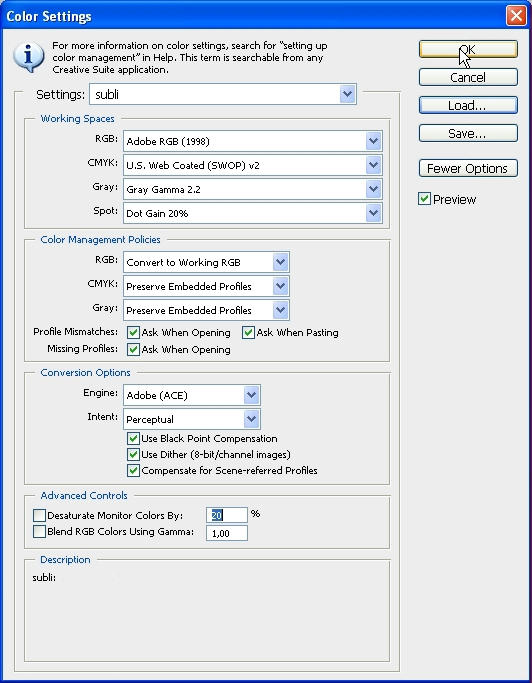
when open your artwork this window should show up:
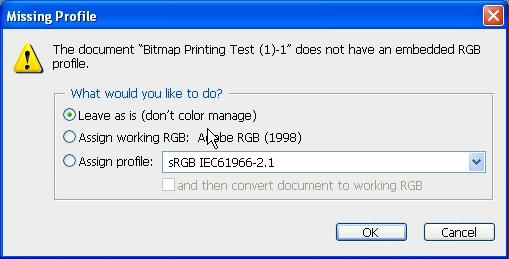
ALWAYS pick "assign to working RGB"
when open your artwork this window should show up:
ALWAYS pick "assign to working RGB"
http://www.howtoprintstuff.co.uk <-- How To Print Stuff BLOG
Re: Ahhh HELP. ICC Profile Problems. Photoshop CS5
thanks for that Paul will give that ago as soon as i can get the printer to print again. Used printer 3 times stopped for 40 mins and when i tried printing the nozzles had blocked and would not clean.. what a joke...lol
Re: Ahhh HELP. ICC Profile Problems. Photoshop CS5
you got ciss attached to it? or refillable carts?
http://www.howtoprintstuff.co.uk <-- How To Print Stuff BLOG
Re: Ahhh HELP. ICC Profile Problems. Photoshop CS5
Paul;52188 wrote:you got ciss attached to it? or refillable carts?
I have reset carts. They have a rubber bung at the front and when i take it out and put it back in the colour starts working again.
Then i do a nozzle check and clean if required. Then do another nozzle check and the colour goes again.
Should i leave the rubber bungs out?
Re: Ahhh HELP. ICC Profile Problems. Photoshop CS5
no. they should be in. how many of them you have in one cart?
http://www.howtoprintstuff.co.uk <-- How To Print Stuff BLOG
Who is online
Users browsing this forum: No registered users and 1 guest