Page 1 of 1
Re: Ricoh SG3110DN - Photoshop cs6 print problems.
Posted: 06 Nov 2014, 01:15
by OnyaPhone
Hi guys,
I am very, very new to the whole sublimation scene. I have been looking for a while and only recently decided to take the plunge and to buy all of the equipment!
I am having some problems with my prints, I am using Sawgrass Sublijet R ink, Ricoh SG3110DN and Photoshop CS6.
My final images look perfect on photoshop but once I print they look really washed out and some shadows really dark. I have fiddled with a few settings and done about 10 prints but I can't seem to get it right, my latest prints look a lot better than my first but still way off what I want.
I have attached an image of my current settings, any help would be much appreciated!!
I have also attached a list of the printer profiles that are on my drop down list. (I have only tried two of them, Glossy and Inkjet paper.. Glossy being the better)
Thanks! :biggrin:
Re: Ricoh SG3110DN - Photoshop cs6 print problems.
Posted: 06 Nov 2014, 07:19
by soulclaimed
Hi firstly download powerdriver from the sawgrass website it is a great tool for settings for sublimation in this printer. Secondly once printed on paper the images will look washed out but you will notice a big difference once they are pressed into an item as the pressed item will look a lot closer to the original design. Lastly make sure you are using sublimation paper as standard paper will not work.
Re: Ricoh SG3110DN - Photoshop cs6 print problems.
Posted: 06 Nov 2014, 12:59
by OnyaPhone
Thank you for the reply, I've sent sawgrass an email as I am having some trouble registering. I will let you know what the print looks like on the final product!
Thank you
soulclaimed;93645 wrote:Hi firstly download powerdriver from the sawgrass website it is a great tool for settings for sublimation in this printer. Secondly once printed on paper the images will look washed out but you will notice a big difference once they are pressed into an item as the pressed item will look a lot closer to the original design. Lastly make sure you are using sublimation paper as standard paper will not work.
Re: Ricoh SG3110DN - Photoshop cs6 print problems.
Posted: 06 Nov 2014, 13:20
by spongerobinson
Looks to me like you might be using a Mac, so the powerdriver will be a no go, but the ICC profile your using in your screenshots are the standard Ricoh ones, not the Sawgrass ones that you will need to use.
Re: Ricoh SG3110DN - Photoshop cs6 print problems.
Posted: 06 Nov 2014, 13:58
by NikGrey
You need to get the driver from Sawgrass - this is what you should see once it's installed:

Re: Ricoh SG3110DN - Photoshop cs6 print problems.
Posted: 06 Nov 2014, 17:03
by pisquee
If you have PS then you don't want PowerDriver, the correct ICC profile for your ink/printer is the best solution, Sawgrass can supply you one.
Re: Ricoh SG3110DN - Photoshop cs6 print problems.
Posted: 06 Nov 2014, 18:01
by soulclaimed
I use elements and Corel draw so can only comment on that never had problems with either with powerdriver
Re: Ricoh SG3110DN - Photoshop cs6 print problems.
Posted: 04 Dec 2014, 19:17
by DANNYD
hi nick, sorry to jump in, I've been having trouble with colours not spot on etc, this is the icc I'm using is this right? Mac 10.10.1
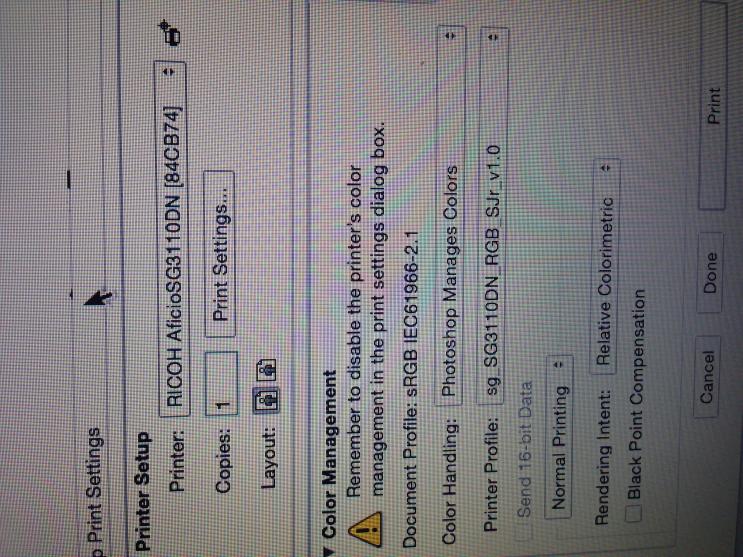
- vB_ID:3091
- IMG_2023.jpg (88.52 KiB) Viewed 49 times
Re: Ricoh SG3110DN - Photoshop cs6 print problems.
Posted: 04 Dec 2014, 19:32
by NikGrey
NO, you need to update that profile.
Re: Ricoh SG3110DN - Photoshop cs6 print problems.
Posted: 04 Dec 2014, 23:46
by DANNYD
Cheers Nik, is it just a case of updating through a download on Sawgrass or do i have to reg it again?