Page 1 of 5
Re: sunangel transfer papers
Posted: 15 Nov 2014, 09:20
by Dave271069
i have just purchased the sunangel white printer and have ordered a few papers to go with it, including the ultralite, ultrabright, and a few sample of the the other one they do,
what im looking for is a thread for people who are already using the above system and what input they have on it, please include any problems you have found and if you have rectified it or how you feel about the finished products,
i will leave my thoughts in a few days/weeks after i have tried and tested it, i must say i am looking forward to recieving it after just using some wow and versacamm stuff im hopeing it can compete with the best
Dave
Re: sunangel transfer papers
Posted: 05 Dec 2014, 10:29
by Dave271069
Ok, sorry for the delay but a very busy time of the year and really haven't put the sunangel to a real test, I have printed a few bits of clothing for myself and the White logo I have printed on my AWDI COOL HOODY looks great and has gone through the wash a couple of time without any issues.
my main problem at the mo is not a sunangel issue but something I need to look into myself, I'm struggling with the masking and layering of images on photoshop, I need to make the White bits in the image red so it will print on the white printer but first I need to arrange a quick training session with my mate before I can then start giving my final verdict,
what i can say is customer service is great and someone is always on the phone or Facebook for immediate advice. I've also been sent some demo papers for hard services like mugs etc so will try and give these a go soon and report back
dave inkdogz
Re: sunangel transfer papers
Posted: 05 Dec 2014, 21:27
by JMugs
Looking forward to hearing all about it Dave.
Janners
Re: sunangel transfer papers
Posted: 06 Dec 2014, 10:41
by spongerobinson
Also looking forward to hearing more [emoji2]
Sent from my GT-I9300 using Tapatalk
Re: sunangel transfer papers
Posted: 06 Dec 2014, 11:18
by socialgiraffe
Just putting something here so I get to read as well.
Re: sunangel transfer papers
Posted: 06 Dec 2014, 12:00
by daviddeer
Dave271069;94898 wrote: I need to make the White bits in the image red
dave inkdogz
There are a couple of methods you can use.
use the magic wand tool with a tolerance of about 35 and click on the white area and go to select-similar.
Play around with the tolerance to get all the white selected. Then paint brush over the image with the red.
or
Use colour replacement tool. select it. For white areas select your new foreground colour (red). Go to the tool options and select luminosity. This will paint the white area grey. Then switch option to colour and repaint. voilà new colour replaces white.
or
select the white areas and then copy them to a new layer (Layer > New > Layer Via Copy) With the new layer selected, click the
fx button on the bottom row of the layers panel, and choose Color Overlay. Set the Blend Mode to Linear Burn, the color to red and play with the opacity. When you are satisfied, click on OK
I am sure there are lots of other ways but I use these most often.
Re: sunangel transfer papers
Posted: 06 Dec 2014, 12:24
by Paul
socialgiraffe;94932 wrote:Just putting something here so I get to read as well.
...and me, so i get notificated

Re: sunangel transfer papers
Posted: 06 Dec 2014, 12:33
by Paul
Re: sunangel transfer papers
Posted: 06 Dec 2014, 13:08
by Dave271069
Thanks guys, will have a play with some designs soon, but I did make my son a superman jumper and the print came out stunning using ultra bright papers and my oki c610
Re: sunangel transfer papers
Posted: 06 Dec 2014, 14:01
by Dave271069
Here is my sons Tshirt I did using ultra bright
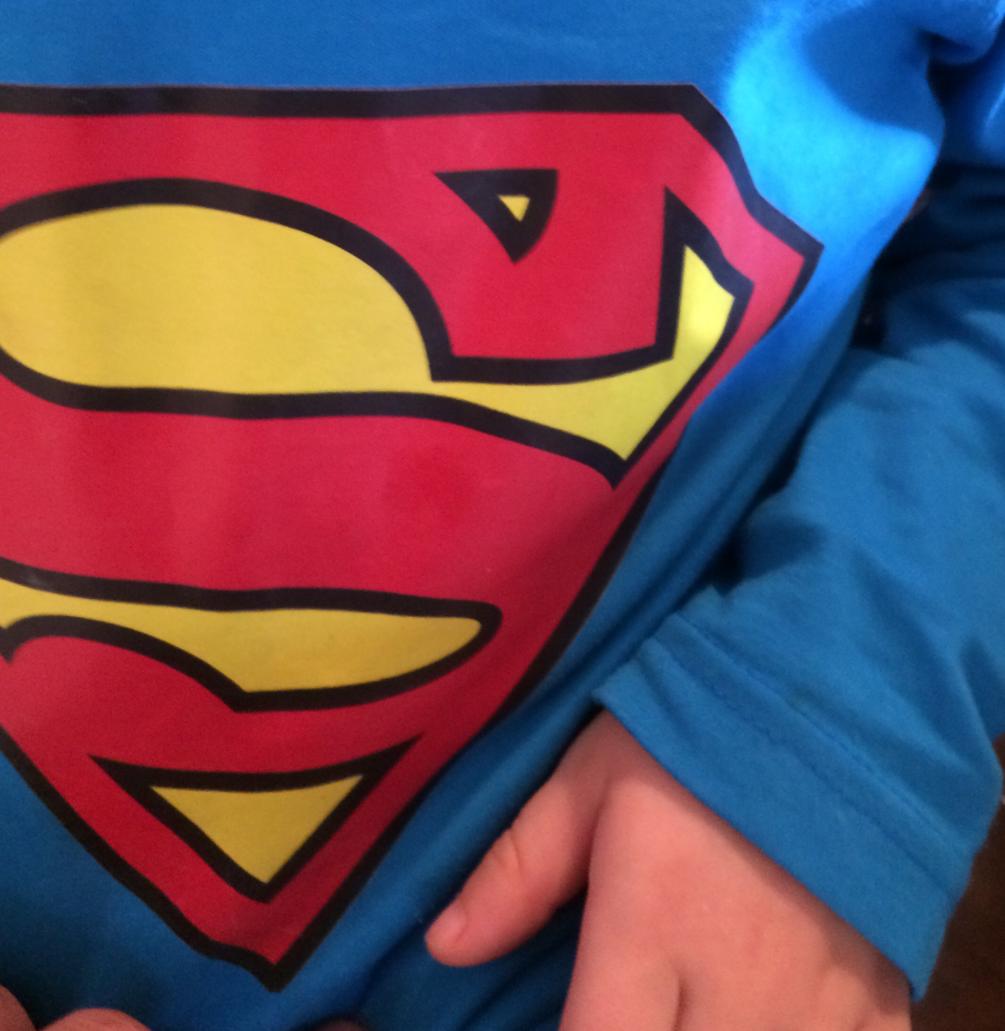
- vB_ID:3102
- image.jpg (81.46 KiB) Viewed 27 times