Any Photoshop experts on here? :-)

Any OS, software in here.
Post Reply
User avatar
Justin
Site Admin
Posts: 12090
Joined: 23 Jan 2026, 13:12
Location: Derbyshire
Has thanked: 11 times
Been thanked: 9 times
Contact:

Re: Any Photoshop experts on here? :-)

Post by Justin »

I have a colour design that needs to be turned into a particular shade of grey. I'm using the colour replacement tool and this appears to be working for most of the design but there's a darker area that just won't change!

Only thing I wondered was if it had multiple layers but I've flattened it already. This is a sample section...could it be that the greys are the same and it's playing tricks on me? I don't think so......
vB_ID:4765
vB_ID:4765
sample.jpg (14.94 KiB) Viewed 4 times
Anyone offer any 'colour change' advice please?
Skye
Posts: 187
Joined: 18 Oct 2013, 11:19
Contact:

Re: Any Photoshop experts on here? :-)

Post by Skye »

vB_ID:4767
vB_ID:4767
justin2.JPG (61.28 KiB) Viewed 4 times
Justin,
I can get it to this, but not sure how much definition it loses.

Open a new layer above your current image.
Fill it completely with the colour grey you are trying to achieve
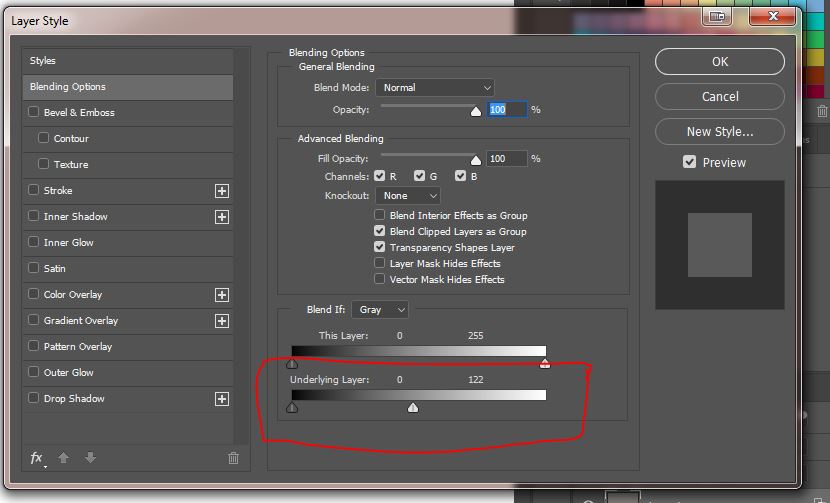
Double click on this grey layer in the layers palette to open the blending options.
In the "blend-if" underlying layer section - Move the right-hand white triangle to the left until you get something you like
vB_ID:4767
vB_ID:4767
justin2.JPG (61.28 KiB) Viewed 4 times
If you want to start with your original colour image, then you could try:
- open it in ps
- image>adjustment>black and white
- choose tint, and put the grey you want in the box

This method might give you what you are looking for as you will need some variations in the grey to give the picture some depth.

Hope this helps
Skye

Attachments
vB_ID:4766
vB_ID:4766
justin.JPG (93.55 KiB) Viewed 4 times
User avatar
Justin
Site Admin
Posts: 12090
Joined: 23 Jan 2026, 13:12
Location: Derbyshire
Has thanked: 11 times
Been thanked: 9 times
Contact:

Re: Any Photoshop experts on here? :-)

Post by Justin »

Thank you Skye, I'll take a look at this again, much appreciated.
User avatar
Justin
Site Admin
Posts: 12090
Joined: 23 Jan 2026, 13:12
Location: Derbyshire
Has thanked: 11 times
Been thanked: 9 times
Contact:

Re: Any Photoshop experts on here? :-)

Post by Justin »

Quick update. I found these instructions online and they seem to have helped.

Step 1: Open up your image and convert to grayscale by going Image>Mode>Grayscale. Step 2: Go to Image>Mode>Duotone. Step 3: In Duotone, choose “monotone” under the dropdown menu. Step 4: click the color swatch for thecolor you want to use (or I copy the exact color code I want into the box)

Once I'd done this I saved for web (jpeg) and it looks much better.
Post Reply

Who is online

Users browsing this forum: No registered users and 1 guest