
Hi folks,
I have recently purchased a mh721 cutter. My problem is i have designed a logo in illustrator on my mac and imported the file in to flexi 7.1 in a windows system and the image edged (especially on the circle) seem to jagged! nevertheless i thought it might just be a display issue but the plotter is also is cutting the jagged lines
the quality of the image is full vector. Also as a trial i created a circle in flexi 7.1 and hit the plot button both plot and display show jagged lines
someone please help me out.
Thank you
mh721 pixalates cut.
-
twrdesigns
- Posts: 13
- Joined: 05 Nov 2010, 00:04
- Contact:
-
mrs maggot

- Posts: 3452
- Joined: 17 Dec 2009, 05:00
- Contact:
Re: mh721 pixalates cut.
sounds like you are not using a compatable format for the cutter, or you have not set up the cutter properly with the cutting software you are using
[CENTER][h=5]A dictionary is the only place where success comes before work[/h]Laura www.fatmaggot.com
[/CENTER]
[/CENTER]
-
twrdesigns
- Posts: 13
- Joined: 05 Nov 2010, 00:04
- Contact:
Re: mh721 pixalates cut.
Thanks Laura, but any ideas of how to get this right.! i have just spent another 3 hrs drawing and plotting circles lol and making adjustments as i go along but still no joy.

Re: mh721 pixalates cut.
does this look familiar??
[URL=http://www.mediafire.com/imageview.php?thumb=6&quickkey=73ad3cdz3kbo6ha]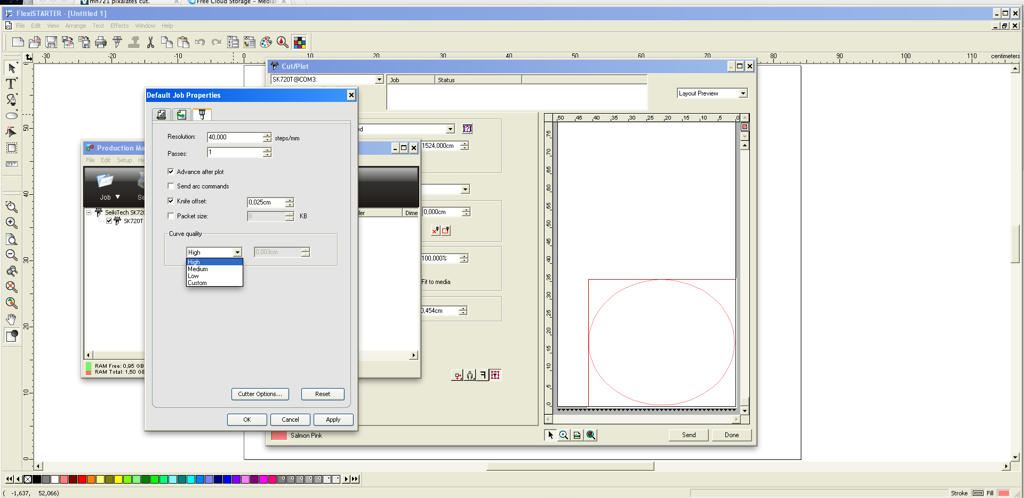 [/url]
would be nice to see your settings buddy.
[URL=http://www.mediafire.com/imageview.php?thumb=6&quickkey=73ad3cdz3kbo6ha]
[/url]would be nice to see your settings buddy.
http://www.howtoprintstuff.co.uk <-- How To Print Stuff BLOG
-
mrs maggot
- Posts: 3452
- Joined: 17 Dec 2009, 05:00
- Contact:
Re: mh721 pixalates cut.
agree with paul, pop up your settings, something you have put is definatley not right,
[CENTER][h=5]A dictionary is the only place where success comes before work[/h]Laura www.fatmaggot.com
[/CENTER]
[/CENTER]
-
twrdesigns
- Posts: 13
- Joined: 05 Nov 2010, 00:04
- Contact:
Re: mh721 pixalates cut.
Hi Paul / Laura, thank you for the info.
i have just checked the settings and it is the same as above ,however the knife offset was on 0.054cm, i have drop this to match above now.i will give this ago , hope it works if not i will add screen dump of what im getting and other settings
Thank you loads.
Aj
i have just checked the settings and it is the same as above ,however the knife offset was on 0.054cm, i have drop this to match above now.i will give this ago , hope it works if not i will add screen dump of what im getting and other settings
Thank you loads.
Aj
Re: mh721 pixalates cut.
what connection you use? maight be worth to change usb or what ever cable you use and see if this change anything...
http://www.howtoprintstuff.co.uk <-- How To Print Stuff BLOG
-
mrs maggot
- Posts: 3452
- Joined: 17 Dec 2009, 05:00
- Contact:
Re: mh721 pixalates cut.
any update did you cure the problem ??
[CENTER][h=5]A dictionary is the only place where success comes before work[/h]Laura www.fatmaggot.com
[/CENTER]
[/CENTER]
-
twrdesigns
- Posts: 13
- Joined: 05 Nov 2010, 00:04
- Contact:
Re: mh721 pixalates cut.
Hi Laura finally i managed to sort that pixelating problem out.dont ask how but i just messed with the setting mentioned above. but i have come across another issue /s.
treat me like "dumb" here! as do not have a clue. but i am currently using Flexisign pro 8.1 , can some one explain how i can contour an image.
Secondly how do you feed that for my specific plotter MH721
im looking for answer and vids but not having much joy.
treat me like "dumb" here! as do not have a clue. but i am currently using Flexisign pro 8.1 , can some one explain how i can contour an image.
Secondly how do you feed that for my specific plotter MH721
im looking for answer and vids but not having much joy.
Who is online
Users browsing this forum: Semrush [Bot] and 1 guest