
I am trying to get my printer setup and while everything has gone fine I am not at all happy with the print quality. I cant seem to find anywhere in photoshop cs5 or photoshop elements 10 on my mac to change the print quality.
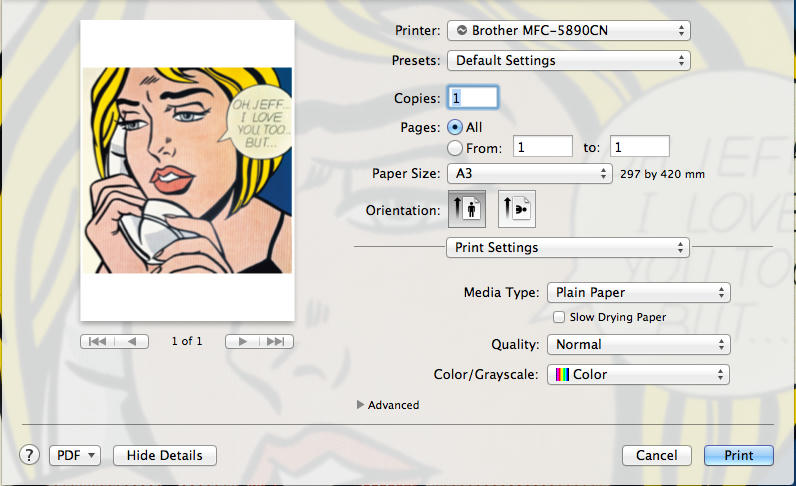
I have been onto brother live support and they said there should be an option under print settings -> media and quality but all I get in there is an option to change the paper type and a feed from option that is greyed out. I did as they suggested and downloaded the brother driver from the printer but I dont see any other options after doing this.
I know some other people have the same printer and just wondering how you get your printer to print photo quality?
Thanks in advance
Anybody with a Brother MFC-5910DW know how to change the print quality on a mac

Re: Anybody with a Brother MFC-5910DW know how to change the print quality on a mac
i have bit older printer and in my driver everything is in place...
http://www.howtoprintstuff.co.uk <-- How To Print Stuff BLOG
Re: Anybody with a Brother MFC-5910DW know how to change the print quality on a mac
ya I'm not getting that quality option, I tried it in Word also just to see if it was available there but it is not.
Re: Anybody with a Brother MFC-5910DW know how to change the print quality on a mac
how about deleting printer and then reinstal it with new drivers?? may help...
http://www.howtoprintstuff.co.uk <-- How To Print Stuff BLOG
Re: Anybody with a Brother MFC-5910DW know how to change the print quality on a mac
Thanks a million Paul, that did the trick, I see what you see now.
Re: Anybody with a Brother MFC-5910DW know how to change the print quality on a mac

i'am glad i could help

http://www.howtoprintstuff.co.uk <-- How To Print Stuff BLOG
Who is online
Users browsing this forum: No registered users and 3 guests