
hi all
i'm having a problem with my printer....heres the story
i am using sublimation inks from ****** so had to get my printer calabrated and got icc profiles to use via photoshop.
i have a epson A4 printer which works fine and the colour is spot on...i have to do the following....open file in photoshop... then press print ....click photoshop manages colour.....then in printer profile i use the icc download for epson....then press print.........then the printer preference i go into advance and click colour controls....then in colour mode i click on adobe rgb....then ok ..print..perfect
the problem with the brother MFC-J9510DW printer is that i can not find the colour mode? or the adobe rgb and the colour is very light and i can not match the other printer
thanks andrew
problem with profile / icc profile
-
andrew1267
- Posts: 10
- Joined: 23 Apr 2011, 20:29
- Contact:

Re: problem with profile / icc profile
you wont get decent print that way but its your choice. you realy need icc to di it right.
but here is some color settings for bros.
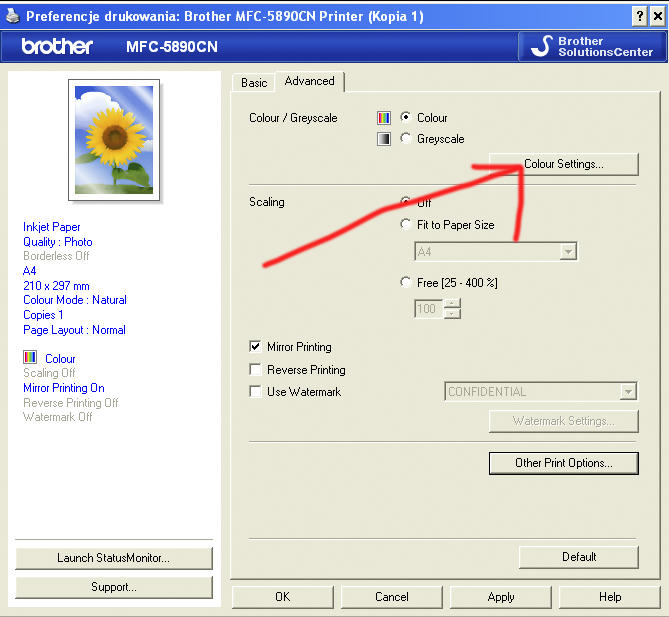
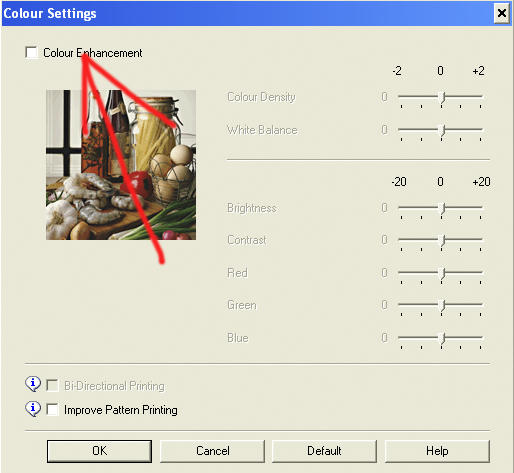
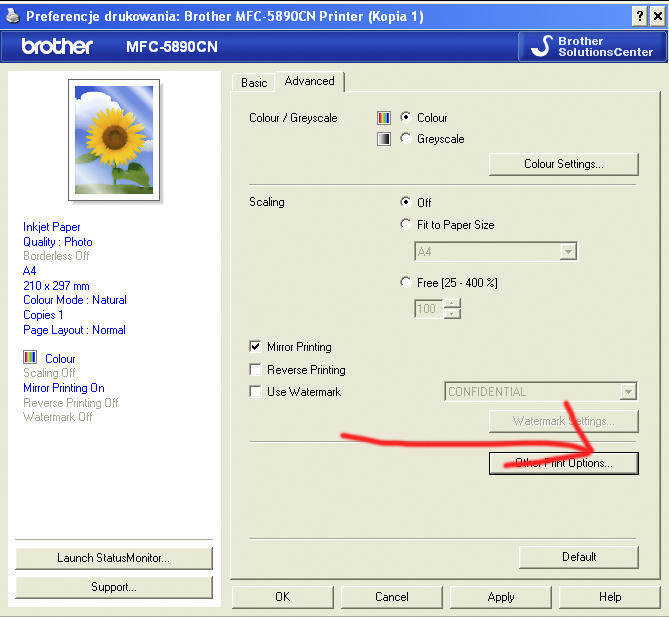
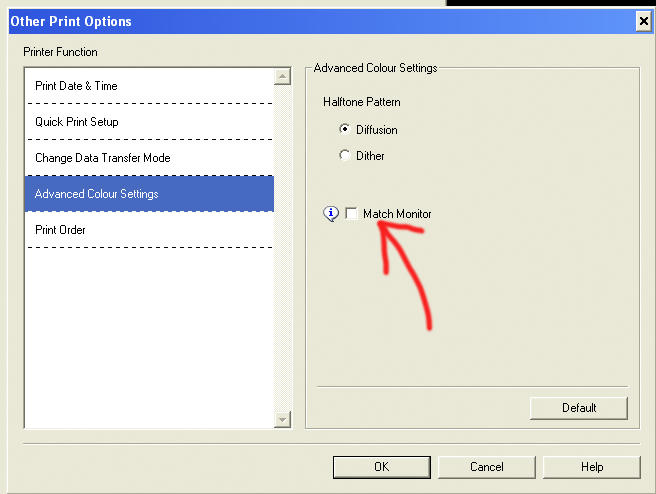
but here is some color settings for bros.
http://www.howtoprintstuff.co.uk <-- How To Print Stuff BLOG
-
andrew1267
- Posts: 10
- Joined: 23 Apr 2011, 20:29
- Contact:
Re: problem with profile / icc profile
Paul;67781 wrote:you wont get decent print that way but its your choice. you realy need icc to di it right.
hi paul.....i do have the icc settings (they were sent to me via email) and was told to download in photoshop which i have done....but on my brother printer i must be doing something wrong
here is what i have been told to do http://www.cityinkexpress.co.uk/support-article/28
i have done everthing with both my printers the epson is fine when i click colour setting adobe rgb
its just the last setting where it says no colour addjustment/ on the brother there is no adobe rgb to select (or should there be?)
thanks andrew
Re: problem with profile / icc profile
For both the Epson and Brother, you;d be best having Photoshop set to Photoshop managers colours, with the ICC profile for your printer/inks loaded here. In the printer drivers for both printers, you want to select No Colour Management/Colour Management Off.
The Adobe RGB 1998 is the colour working space for Photoshop.
If you follow the Photoshop set up instructions from Sawgrass, but put your supplied ICC profiles in instead of the Sawgrass ones, you should then be able to get Photoshop set correctly for colour management, and then just remember to turn it off in the printer drivers.
The Adobe RGB 1998 is the colour working space for Photoshop.
If you follow the Photoshop set up instructions from Sawgrass, but put your supplied ICC profiles in instead of the Sawgrass ones, you should then be able to get Photoshop set correctly for colour management, and then just remember to turn it off in the printer drivers.
-
andrew1267
- Posts: 10
- Joined: 23 Apr 2011, 20:29
- Contact:
Re: problem with profile / icc profile
pisquee;67823 wrote:For both the Epson and Brother, you;d be best having Photoshop set to Photoshop managers colours, with the ICC profile for your printer/inks loaded here. In the printer drivers for both printers, you want to select No Colour Management/Colour Management Off.
The Adobe RGB 1998 is the colour working space for Photoshop.
If you follow the Photoshop set up instructions from Sawgrass, but put your supplied ICC profiles in instead of the Sawgrass ones, you should then be able to get Photoshop set correctly for colour management, and then just remember to turn it off in the printer drivers.
i have loaded the new icc prifiles into photoshop cs4
and still getting the same faint result....i must be doing something wrong with the printer settings?...i have it selected on colour mode off and match moniter off
i dont know want sawgrass is....this is really baffaling me (and that dosent take much)
Re: problem with profile / icc profile
Andrew. This sounds like you have one icc for two diferent printers.
to make it work you need icc for your exact ink and exact printer. So if you have icc for epson then it wont work on brother.
to make it work you need icc for your exact ink and exact printer. So if you have icc for epson then it wont work on brother.
http://www.howtoprintstuff.co.uk <-- How To Print Stuff BLOG
-
andrew1267
- Posts: 10
- Joined: 23 Apr 2011, 20:29
- Contact:
Re: problem with profile / icc profile
Paul;67948 wrote:Andrew. This sounds like you have one icc for two diferent printers.
to make it work you need icc for your exact ink and exact printer. So if you have icc for epson then it wont work on brother.
i have a icc prifile for the brother as well.........but not sure which printer settings i have to put them on ..... on the epson i put the printer settings on adobe rgb 2.2..........but on the brother printer i can not see that anywhere?
any help would be great
Re: problem with profile / icc profile
You canot set profile in epson driver. As it wont use your sublimation icc. Its double profiling. All profiles need to be switched off in driver. Icm off.
http://www.howtoprintstuff.co.uk <-- How To Print Stuff BLOG
Re: problem with profile / icc profile
In the Epson and Brother printer drivers, you need to have all colour management turned off, and the print/media setting set to what they were for the custom ICC creation.andrew1267;68335 wrote:on the epson i put the printer settings on adobe rgb 2.2.
Adobe RGB is not a printer ICC profile!
Your printer ICC profile goes into Photoshop in the print dialog along with selecting for Photoshop to manage colours.
Re: problem with profile / icc profile
Please watch this video for setting up colour management within Photoshop...
Who is online
Users browsing this forum: No registered users and 2 guests